
Digital Detox Camping: How to Unplug for a Weekend and Keep Your Phone as a Safety Net
It’s Saturday afternoon at camp, and you’ve just checked your phone for the fifth time, just in case. Nothing’s there, and somehow you feel a little worse for looking, not safer.
That pull is normal, and it isn’t a willpower problem. The same phone is your trail map, your camera and the only way anyone can reach you if something goes wrong, so switching it off feels reckless.
Most advice you find on digital detox camping stops at “put it away”, without a word on how to stay reachable. What you want is a weekend away from the screen that keeps the safety net in place.
By the time you pack, you’ll know how far to unplug for this trip, how to set your phone so only the one person holding your plan can get through, and how to keep it out of your hand for the rest of the weekend.
TL;DR: Digital Detox Camping
- Unplug from the feed, not from the phone. It stays on as your map, your camera and your emergency line.
- Before you leave, give one person your trip plan and agree a check-in time.
- Set a Focus (iPhone) or Do Not Disturb (Android) so only that person and repeated calls get through, and use airplane mode only once you’re out of coverage.
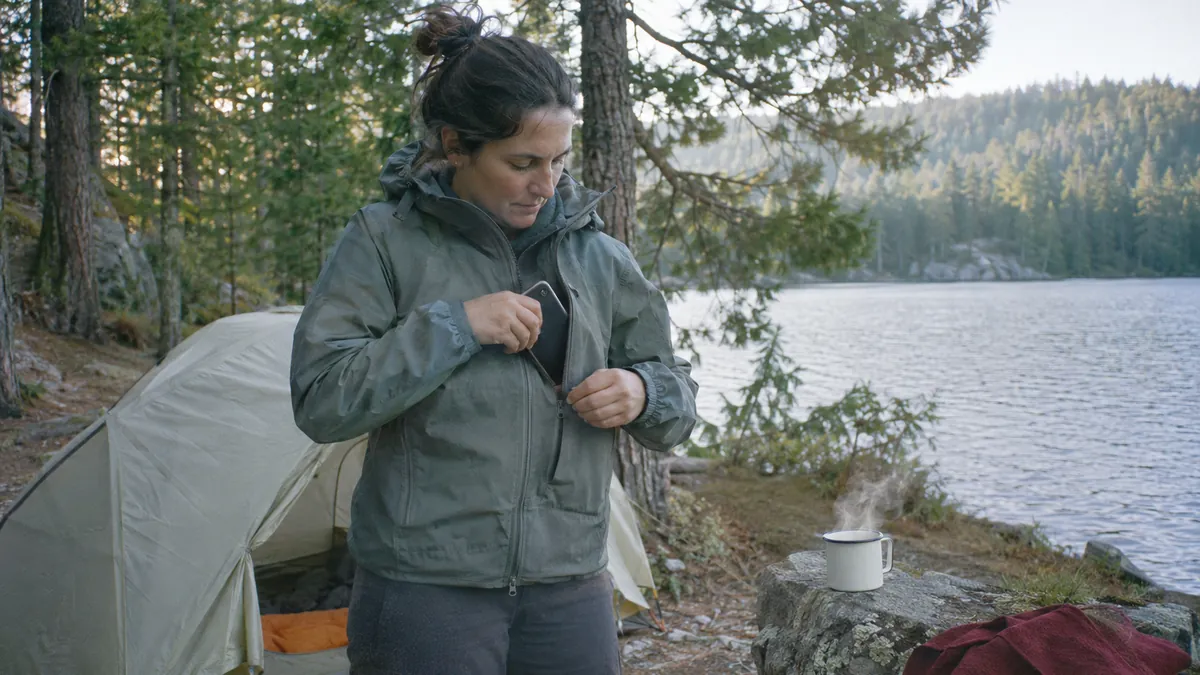
- Keep the phone in your pocket on the trail, and at night put it face down in the tent pocket with the Focus or Do Not Disturb still on.
Decide What Digital Detox Camping Means for This Trip
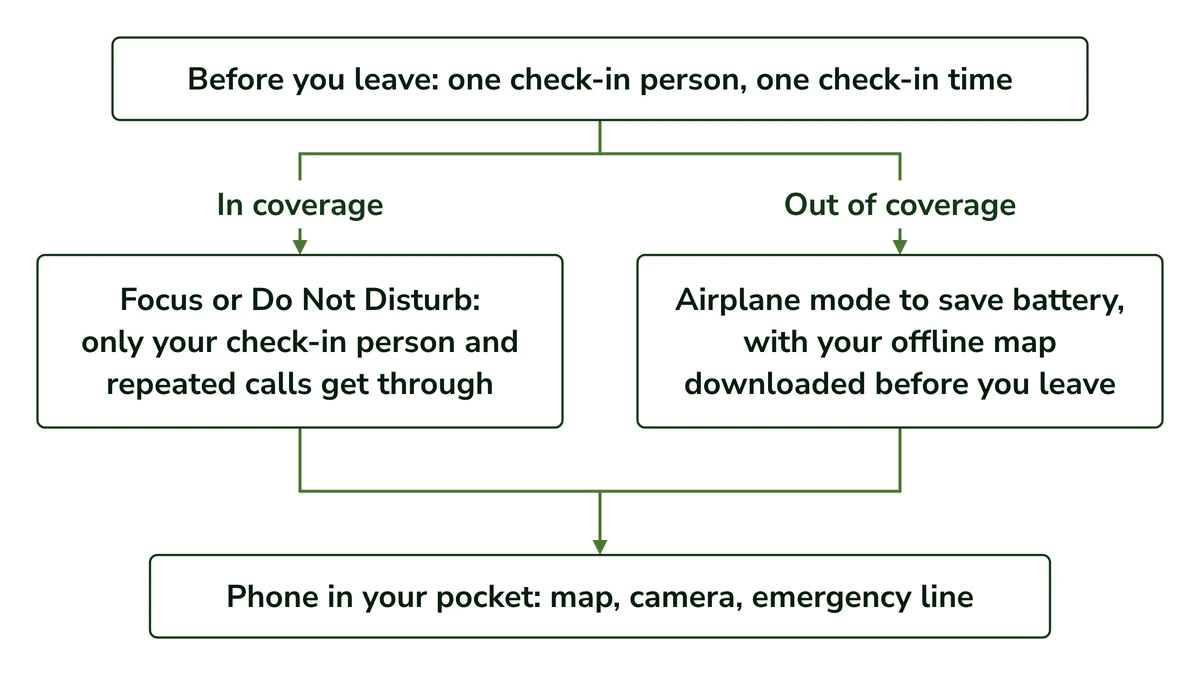
Unplugging doesn’t have to mean switching off. Decide what your phone has to do this weekend, who must be able to reach you, whether your campsite has coverage and how long you’ll be out. Those four answers tell you how far to unplug, and which setting does it.
If it’s Friday night, the car is half packed and you still can’t decide whether “detox” means the phone stays in the glovebox, you’re asking the right question. It’s a decision you make for each trip, and the answer can change from one trip to the next.
The idea is that the phone keeps the jobs that keep you safe and loses the ones that pull you back to the feed. These four questions sort out which is which:
- What the phone has to do this trip. For most weekends that’s three jobs: map, camera and emergency line. Everything else can wait until you’re home.
- Who must be able to reach you. Usually it’s one person, the one who knows your plan, and that’s what makes the phone setting later in this guide possible.
- Whether your campsite has coverage. That decides whether the phone can ring at all, and when airplane mode starts to make sense.
- How long you’re out. One or two nights is easy to plan around. The longer the trip, the more the battery and the check-in time matter.
None of these questions is about willpower. The answers turn into a setting on your phone, and the rest of this guide walks through that setup in order.
If you’re unsure where to land, here’s my call: I’d keep the phone on and narrow who can reach it, rather than switch it off. The next section explains why the research leans the same way.
Before you read on, pick your check-in person: the one who’ll hold your plan this weekend.
Why Switching Your Phone Off Isn’t the Calmer Choice
Switching off sounds like the purest detox, but the research doesn’t back it. A review of 21 digital detox studies found phone use fell, craving rose where it was measured, and stress and mood results were mostly mixed. In one campus study, switching off didn’t help people connect with nature.
The usual idea is that a real detox means the phone off, or left in the car. I understand the appeal, but I don’t think the phone in your pocket is the problem. The phone in your hand is.
Switching off also has a cost you can feel right away. With the phone off in the glovebox, the thought of a missed call from home can follow you down the trail, which isn’t the quiet weekend you came for.
The best summary so far is a 2022 systematic review by Radtke and colleagues. It pulled together 21 studies of digital detox with 3,625 people, and 12 of those studies were randomized.
Phone use did fall. But in the three studies that measured craving and withdrawal, both went up. Single studies also found more boredom, loneliness or fear of missing out, though others found less or no change.
Results for stress, mood, anxiety and sleep were mixed: three of five stress studies found a drop, for example, and two found none. Only 6 of the 21 studies were rated high quality, most used small groups of students, and the authors say no clear answer can be given yet.
My reading of that craving result is simple. When the phone is gone entirely, the worry about being unreachable doesn’t go with it, so the urge to check has nowhere to land.
One study looked at this outdoors. Colléony and colleagues asked 303 young adults to spend 30 minutes outside on a university campus.
Those told to switch their phones off, or put them in airplane mode, didn’t interact with nature any more than those given no instruction. The authors suggest that telling people what not to do may backfire.
That’s one study, with young adults and a single 30-minute stretch outdoors, so I wouldn’t build much on it. It just doesn’t support the idea that switching off makes the time outside better.
You may also have seen the claim that a few days off screens makes you 50% more creative. It comes from a study by Atchley and colleagues of 56 Outward Bound participants on 4 to 6 day trips.
The catch is in the design. The 24 people tested before a trip and the 32 tested on day 4 were different people, and the day 4 group scored about 50% higher on a 10-item word test.
The authors say they can’t separate the effect of nature from less technology or anything else about the trip. So the number says something about a whole trip, and nothing on its own about the phone.
None of this is an argument against time outside. If you want the evidence on that read plainly, limits included, I’ve set out what the research shows about time outdoors in its own guide.
I read the detox research this way: it doesn’t show that switching off is reliably the calmer choice, and some results point the other way.
Most of those studies were breaks from social media rather than from the phone itself, which is close to what this guide suggests. So keeping the phone on for safety doesn’t cost you the calm you came for.
Before You Leave: Tell One Person, Then Set Up Your Phone
Before you leave, give one person your trip plan and agree a time you’ll check in. Then set a Focus on iPhone or Do Not Disturb on Android so only that person gets through, plus repeated calls, for anything urgent. Once you’re out of coverage, airplane mode saves battery.
The two steps fit together. Your check-in person holds your plan, and the phone setting lets exactly that person through while everyone else waits.
I’d pick one person over a group chat every time. A group chat keeps buzzing with things that aren’t for you, and it’s never clear who’s actually keeping track of when you’re due back.
It’s often the person at home who worries more than you do. They can’t see the campsite, so a quiet phone can look like something went wrong.
They may still worry a little, and that’s fair. The agreed check-in time is what handles it: until that time passes, a quiet phone just means you’re out there doing what you planned.
Agree a Check-In Time With the Person Holding Your Plan
Tell your check-in person where you’re going, when you’ll check in and when you expect to be home. Pick a check-in time when you expect to have signal, such as the drive out, so the message can actually go through.
Agree, too, what they’ll do if that time passes without word from you. I’ve set out what to leave with them, and that next step, in the trip plan and phone setup for your hike, so I won’t repeat it here.
Silence Everyone but Your Check-In Person
Your phone decides which calls ring and which wait quietly, and you can tell it to let one person through. A second call within a few minutes is a good sign that something can’t wait, and both iPhone and Android can let repeated calls break through.
On iPhone, the setting is a Focus. Apple’s Focus instructions show how to choose the people you receive notifications from, so your check-in person goes on the allowed list and everyone else waits.
Apple’s guide also lets through calls from groups you choose and repeated calls (two or more from the same person within 3 minutes).
For your check-in person you can go one step further: in Contacts, edit their card, tap Ringtone and turn on Emergency Bypass, so their calls ring even when everything else is silenced.
On Android, the same job is done by Do Not Disturb or Modes, depending on your phone. Android’s Do Not Disturb instructions show how people filters can allow calls or messages from the people you choose.
Android also has “Allow repeat callers”, which lets a call through when the same person calls twice in 15 minutes. Settings vary by phone maker, so the names on your screen may differ a little.
Here’s the same setup side by side, so you can find the line you need for your phone.
What you want
iPhone (Focus)
Android (Do Not Disturb or Modes)
Let your chosen people through
Choose the people you receive notifications from
People filters allow calls or messages from the people you choose
Let a repeated call break through
Two or more calls from the same person within 3 minutes
“Allow repeat callers”: the same person calling twice in 15 minutes
Let emergency contacts through
Turn on Emergency Bypass on that person’s contact card, or list them in Medical ID
Not named on Google’s page, so check your phone’s settings
Let your chosen people through
iPhone (Focus): Choose the people you receive notifications from
Android (Do Not Disturb or Modes): People filters allow calls or messages from the people you choose
Let a repeated call break through
iPhone (Focus): Two or more calls from the same person within 3 minutes
Android (Do Not Disturb or Modes): “Allow repeat callers”: the same person calling twice in 15 minutes
Let emergency contacts through
iPhone (Focus): Turn on Emergency Bypass on that person’s contact card, or list them in Medical ID
Android (Do Not Disturb or Modes): Not named on Google’s page, so check your phone’s settings
Quick Tip: Before you leave, ask your check-in person to call you twice in a row. That way you both know the repeat call gets through, before you need it to.
Airplane Mode Only Once You’re Out of Coverage
In coverage, airplane mode would block your check-in person along with everyone else, so it only makes sense once you’ve lost signal. Out there, it saves battery, because the phone stops searching for a signal it can’t find.
Whatever mode it’s in, the phone keeps its three jobs:
- Map: download your offline map before you leave, because it won’t load once the signal is gone.
- Camera: it works the same with or without signal, so the photos you want are still yours to take.
- Emergency line: this is why the battery matters most. A power bank and, on phones that have it, satellite SOS are the backups for this job.
Keep the Phone in Your Pocket, Not Your Hand
Keep the phone on, but in your pocket rather than your hand. In a small randomized trial, people who read on a phone during a park walk felt worse and less connected with nature than people walking phone-free. And your check-in person can already reach you.
That trial, by Collin and Broadbent, had 124 adults, mostly students, walk 1 km (about 0.6 miles) through a park. Reading neutral text on a phone lowered both their mood and their sense of connection with nature, and they walked slower and more stooped.
Connection with nature explained about half of that drop in mood. The study is preliminary and short-term, and it didn’t test texting, so I wouldn’t stretch it far.
What it measured was the phone in use, and that’s the habit worth breaking on the trail. The urge to check usually arrives as “just in case”, but your check-in person can already reach you, so a quick look adds nothing to your safety.
And one look is rarely just one. It can turn into scrolling, or into standing on a picnic table hunting for a bar of signal.
The camera is the hardest job to let go of, because of the worry that if you don’t take pictures, you’ll forget the weekend. You don’t have to let it go. Take the photos you want, then put the phone back in your pocket.
That does mean fewer photos than usual, and no instant replies to anyone but your check-in person. That’s the real trade, and for a weekend I think it’s a fair one.
My call on the trail is to give the phone one home, a zipped pocket, and take it out when you need the map or a photo. When it isn’t already in your hand, one look is much less likely to become ten minutes.
What to Do With the Time at Camp
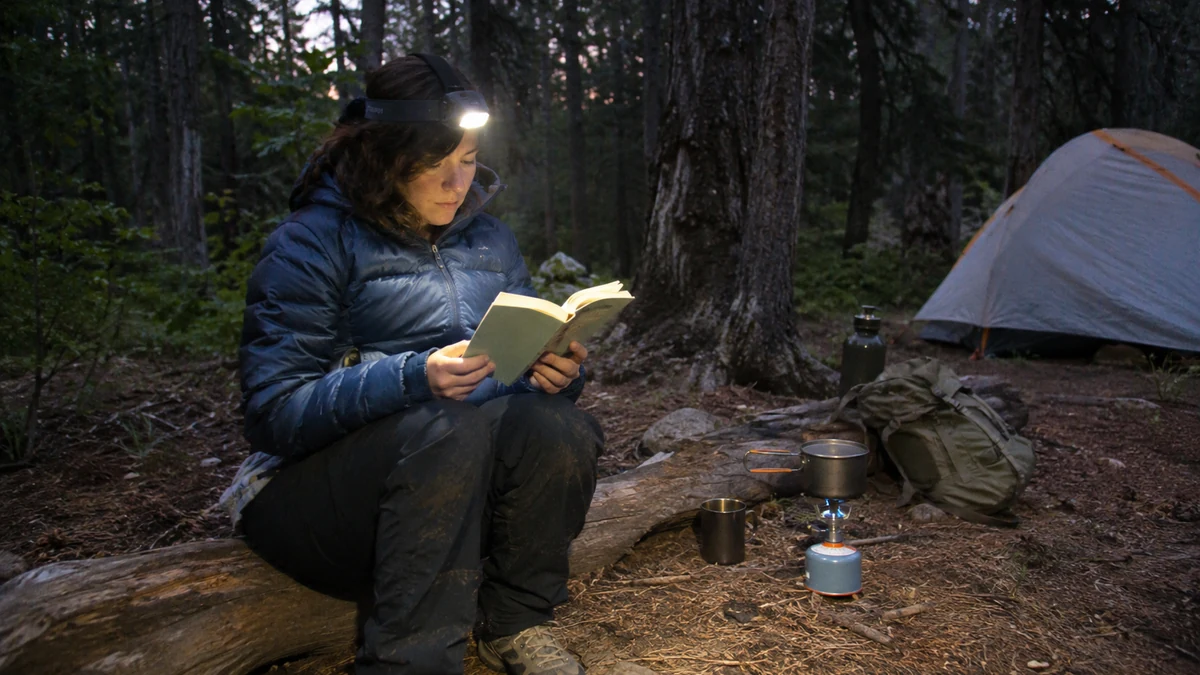
Give the phone’s jobs away. A headlamp takes over as flashlight, a stove and mug take the morning, and dinner, a short walk, a book or the stars fill the evening. A dark, screen-light evening also suits sleep: the CDC suggests devices off at least 30 minutes before bed.
At camp, the phone comes out for jobs that have nothing to do with the feed, and the flashlight is the big one. A headlamp takes that job and leaves your hands free, so the phone can stay put away.
The first reach for the phone tends to happen before you’re even out of the sleeping bag. Give that moment a different job: water on the stove and a mug in your hand.
If you want that first cup to be worth getting up for, my guide to making a good cup at camp gives the morning a real method.
Evenings fill up on their own once the phone isn’t filling them. Cooking dinner is a good start, and an easy one-pot camp dinner keeps it simple. After that there’s a short walk before dark, a book, the stars or a paper journal.
I’d keep the list short on purpose. You don’t need a schedule for the evening, just one or two things that aren’t the screen.
Then there’s sleep. In a small camping weekend study by Stothard and colleagues, 9 people went camping for a summer weekend while 5 stayed home.
The campers’ melatonin onset (the point in the evening when the body starts releasing its sleep hormone) moved about 1.4 hours earlier. For the group at home, it moved about 1 hour later.
It’s a small study and not randomized, and it measured light exposure overall, not phone use. The campers were even allowed flashlights or headlamps, so I’d keep the claim narrow: their sleep timing shifted earlier over a weekend outdoors, and that’s what it shows.
The plain rule comes from the CDC, which lists turning off electronic devices at least 30 minutes before bedtime among its sleep habits.
At camp I’d keep the screen part of that habit and leave the phone on, because your check-in person still needs to be able to reach you.
Quick Tip: Put the phone away at least 30 minutes before bed. Keep it on, face down in the tent pocket with the Focus or Do Not Disturb still on, and let the headlamp do the late jobs.
Coming Back Online Without the Sunday Night Flood
Coming back online is part of the plan. Message your check-in person first so they know you’re back, then switch the Focus or Do Not Disturb off and let the messages arrive. Expect a flood or an odd quiet: either can happen, and neither means you got the weekend wrong.
The Sunday night dread is real: you know a pile of notifications is waiting the moment the setting goes off. Closing the plan first helps, because the one message that matters goes out before the pile arrives.
Whatever lands when the setting goes off says nothing about how the weekend went. A flood only means people kept talking, and a quiet phone only means they knew you were away.
The setting itself stays saved on your phone, so next trip it’s one switch away. If you keep one thing from this weekend, make it that allow list. It’s what let you stay reachable without being on call.
Before you pack for your next trip, put your check-in person in a Focus or Do Not Disturb and ask them to call twice to test it.
Founder & Gear Research Editor
Sonia Zannoni
I’m Sonia, the founder of Best Trail Backpacks. I don’t test gear myself. For every pack I cover, I read the manufacturer’s specs and sizing charts and look for what owners report again and again.
Fit comes first, because a pack that doesn’t match your torso and hips will hurt no matter what it cost. My goal is to help you choose a pack that suits your body, your trip and your budget.
About the Founder
